Grow a Pet Fighter Screenshots
Every image the developer published on the game's Roblox page, at full width, with a note on what each one actually shows.
In-game screenshots
What these tell you before you play
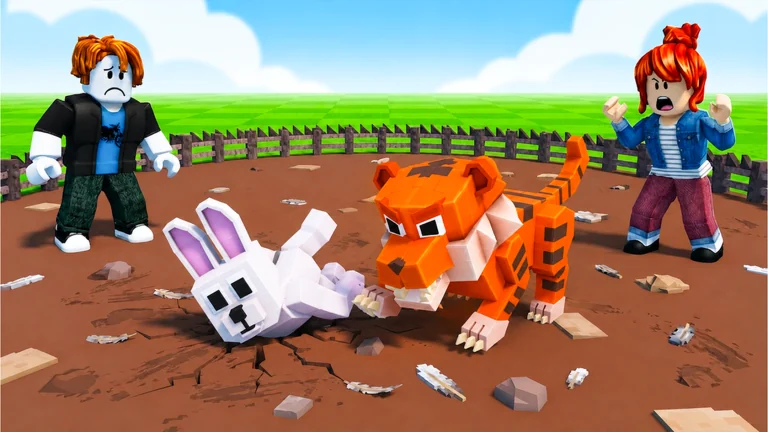
Both images on this page are promotional artwork rather than screenshots, and the distinction matters more here than it usually does. Neither frame contains a menu, a button, a counter, a health bar, a timer or a single character of text. There is no number anywhere in either image. That is why nothing on this site is priced, timed or ranked from a screenshot, and why the colours used here come from the artwork rather than from the game's interface: we have never seen the interface.
What the two images do show consistently: a round arena of brown dirt ringed by a black stake fence, bright green grass beyond it, and in the thumbnail a blue sky with white clouds above an open field. A striped orange tiger-like pet with a golden glow at its paws is fighting a white rabbit-like pet carrying a purple glow at its feet and in its ears. Two Roblox avatars are in frame as spectators in the icon, and reacting in the thumbnail, which suggests at least two players can be in the arena area at once without being the ones fighting.
The one difference between the two images is where the fight is: in the icon the tiger is still lunging and the rabbit is upright, and in the thumbnail the rabbit is already on the ground and the tiger is over it. Store art is built from the most dramatic available moment, so neither frame tells you how long a fight takes, what it costs, or what happens when a pet loses.
What these images do not settle, in a list, because this is the part that gets invented on other sites: how many eggs or pets exist, what any of them cost, how strong one pet is next to another, whether the fight uses moves or is automatic, how high the tower goes, and what cash buys. The developer has published five sentences about this game and no pictures of its interface, and we are not going to fill the space between them with plausible-sounding detail.
Why the image count is what it is
Roblox gives a developer a fixed number of image slots on their store page, and most games use them as advertising rather than documentation. That has two consequences for anyone reading a game's pictures to work out what it is like.
The first is that the images are chosen, not sampled. Every frame is the most flattering one available, which means a game with a boring core loop can still look eventful, and a game whose appeal is in slow progression will photograph badly. The second is that the set is small and static: a game that adds content for months often keeps the same handful of promotional images, so a store page can lag the game by a long way. A description is usually updated sooner than the art is.
That is why our guides are built from the developer's description and from Roblox's own records rather than from its screenshots. This game's badge list is empty, so there is no badge record to read — which is itself worth knowing, and it is stated where it matters rather than here.
How to read a Roblox store image
Three things are worth looking for, in this order:
- Interface elements. If a counter, a currency or a health bar is visible, that tells you what the game measures. If none is visible, the image is marketing rather than a screenshot, which is the most common case.
- How many players are in frame. A co-op game photographs its group; a solo game photographs one character. This is a rough but useful signal about the shape of the game.
- What the environment implies. Open water, a city, a single room — the setting is usually the most reliably reported thing in promotional art, because it is the hardest to exaggerate.
What is not worth reading from these images: prices, drop rates, tier lists, or how strong anything is relative to anything else. None of that photographs.
Artwork and screenshots are the property of God Bless Zak 7 and are reproduced here at reduced size for identification and commentary.